 Keepsake Tabs
Save your tab groups, names and colours included.
Keepsake Tabs saves your windows, tabs and tab groups and quietly snapshots your session every 5 minutes. If Chrome crashes or an update closes your windows, you go back to a recent snapshot instead of rebuilding your workspace from memory.
Free to install. Pro is a one-time key, no subscription.
- No account
- Stays on your device
- Snapshots every 5 minutes
- Imports OneTab & Session Buddy
A list of links isn't a workspace.
You grouped forty tabs into Research, Clients and Later, colour by colour. Then Chrome restarted.
The tabs come back as one flat window, or not at all, and the group names and colours you set up are lost.
Many savers keep a plain list of URLs. The structure that made the session useful doesn't survive.
Reopening hundreds of tabs at once can bring the browser to a crawl right when you need it back.
Import OneTab text lists and Session Buddy exports (current and older formats) in one step, free. Your groups then come back as real tab groups, with names and colours.
OneTab and Session Buddy are trademarks of their owners; Keepsake Tabs is not affiliated with them.How Keepsake Tabs works
Snapshots start on their own, every 5 minutes. The free plan keeps the newest three.
Press Save open windows to keep a named session with every group, name and colour.
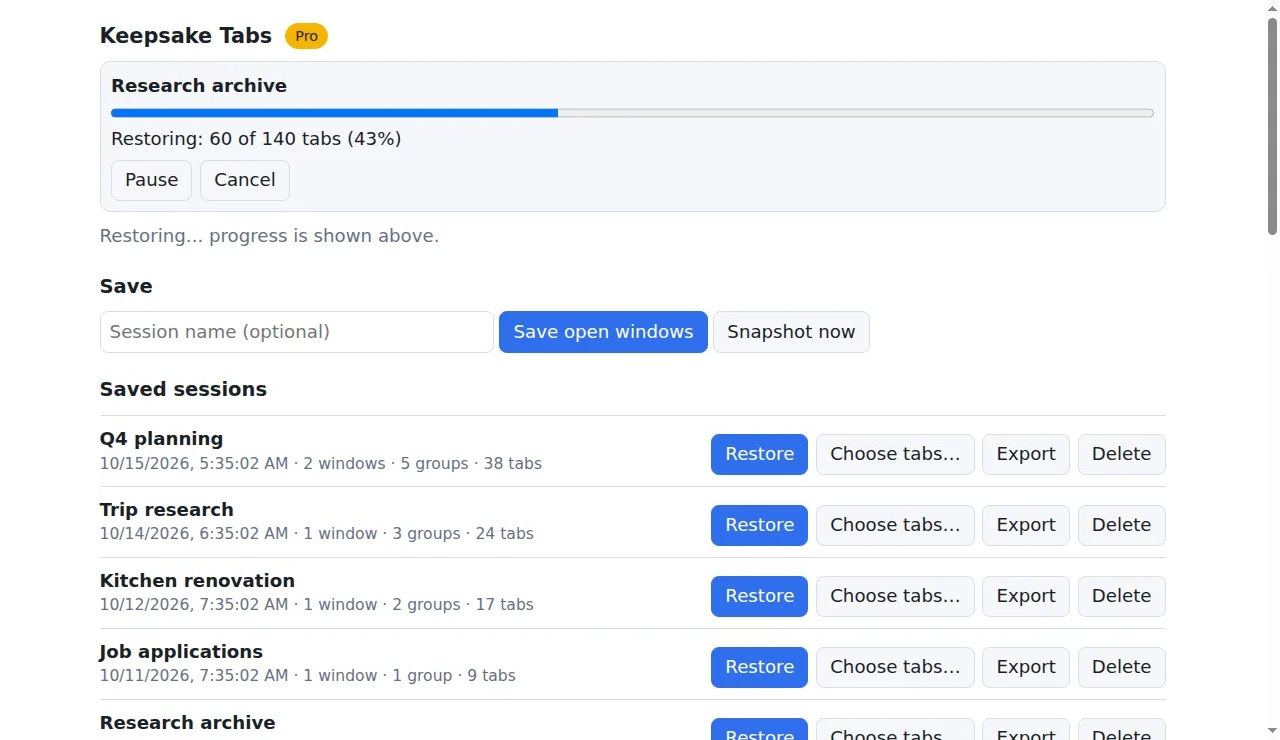
Tabs return in paced batches as light placeholders that load when you open them.
A session manager that keeps tab groups intact
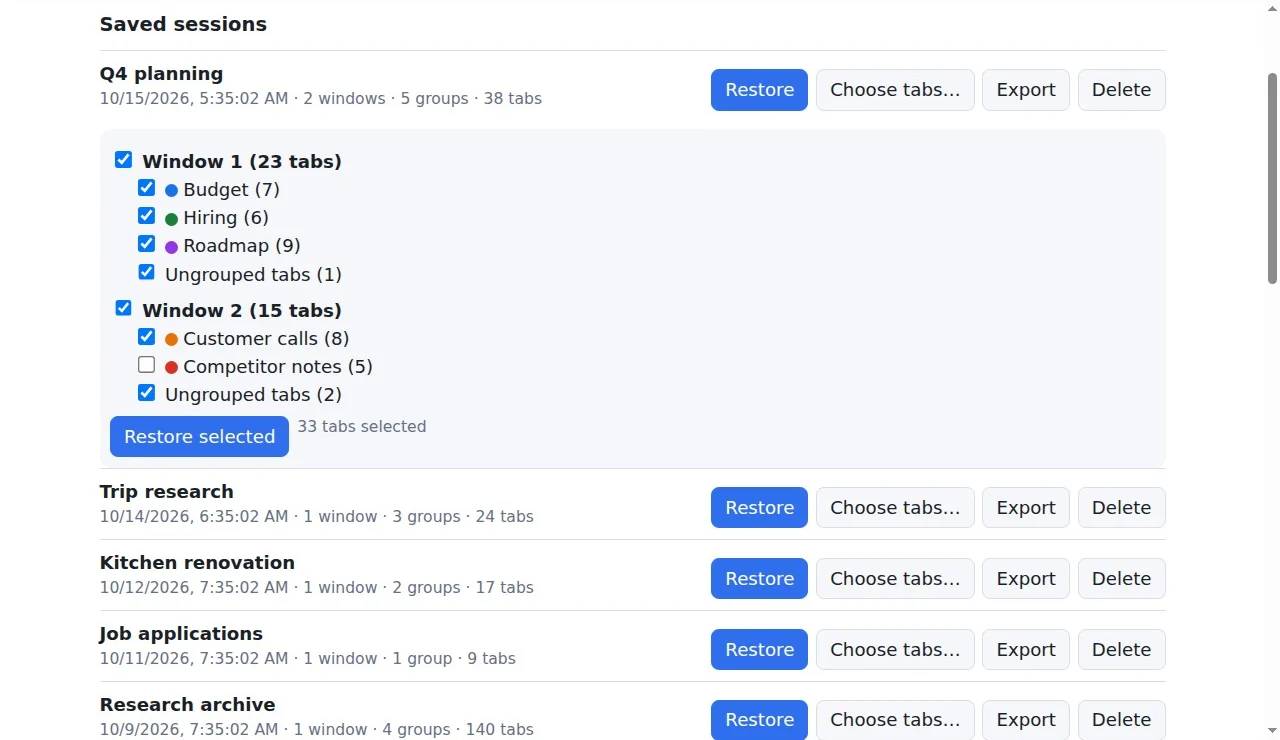
Group names, colours and collapsed state are saved with your windows and tabs.
A snapshot every 5 minutes, so you can go back to how things were before the crash.
When open tabs suddenly drop a lot, the largest snapshot from before the drop is set aside so newer ones can't push it out.
Large sessions return in small batches. Pro adds a progress bar with Pause and Resume.
Import OneTab lists and Session Buddy exports (current and older). Toby import in Pro.
Export to JSON any time. Pro schedules daily or weekly backups to your Downloads folder.
Keepsake Tabs pricing: free, or one-time Pro
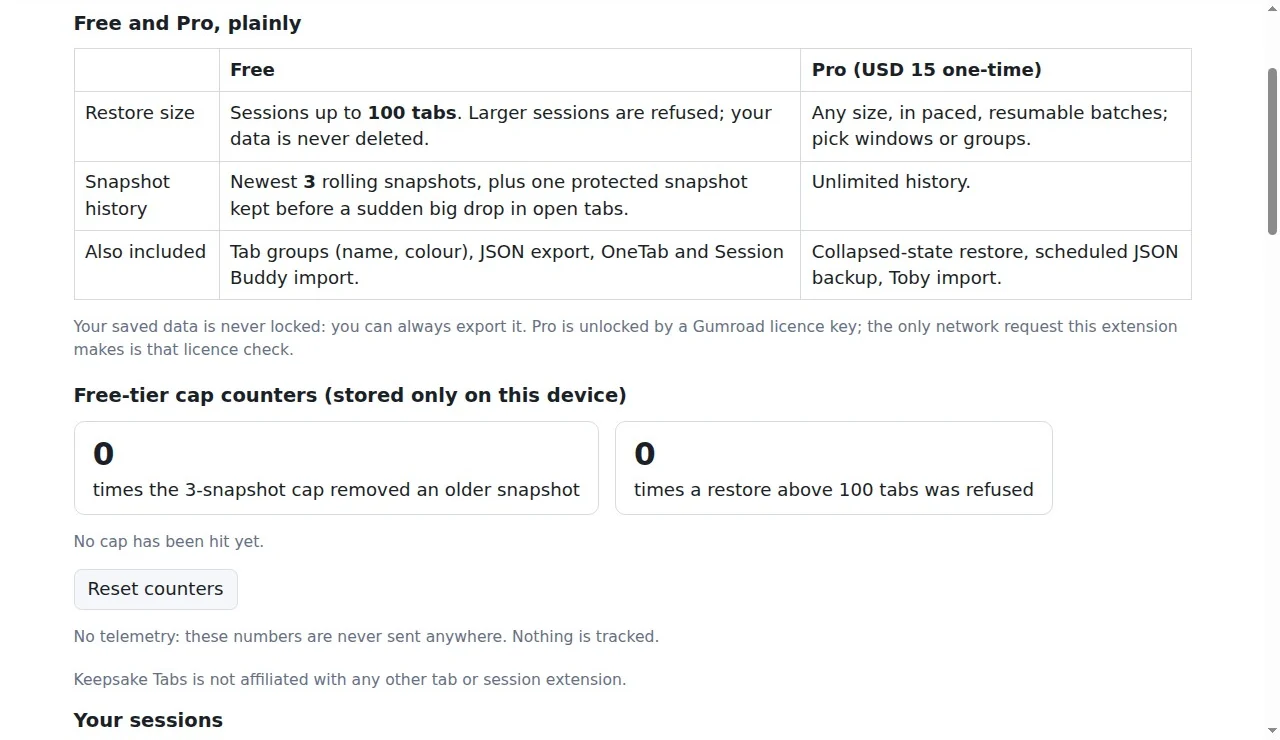
Free won't restore a session over 100 tabs; it tells you so. Your saved data is never deleted or locked.
Free
No account. No trial clock.
- Restore sessions of up to 100 tabs
- Newest 3 rolling snapshots + 1 protected snapshot
- Tab group names and colours
- JSON export, OneTab and Session Buddy import
Pro One-time
One-time payment. No subscription. 30-day refund.
- Restore sessions of any size, with Pause and Resume
- Pick which windows or groups to restore
- Restore groups collapsed, as they were
- Unlimited snapshot history
- Scheduled daily or weekly JSON backups
- Toby import
Pro is a licence key sold on Gumroad by MAW2IN. You paste the key into the extension to unlock Pro.
Your sessions never leave your computer.
No account, no cloud, no tracking. Everything Keepsake Tabs saves lives in your browser's own storage.
- Local onlySessions, snapshots and settings stay in your browser profile.
- No trackingNo ads, no analytics, no telemetry. Two counters (how often you hit the free limits) stay on your device.
- One-time priceFree restores up to 100 tabs, with no time limit. Pro is a one-time key.
Exactly what happens with your data
- What is stored
- Tab URLs, titles and order, group names and colours, in your browser profile only.
- The only network call
- The Pro licence check with Gumroad (
api.gumroad.com), when you enter a key and now and then to re-check it. - If Gumroad is unreachable
- Pro keeps working. Nothing is taken away.
Keepsake Tabs FAQ
Chrome already lost my tabs. Can Keepsake Tabs bring them back?
Only what it saved. It can't recover a session from before it was installed. Install it now, and next time you'll have a recent snapshot to go back to.
Does it save tab group names and colours?
Yes. Groups are saved with their name, colour and collapsed state, and they're restored as real tab groups.
Will restoring a big session freeze my browser?
Tabs reopen in small paced batches as unloaded placeholders that load when you click them. Speed depends on your machine and how many tabs you restore, and Chrome itself can still struggle with very large sessions.
Can I move over from OneTab or Session Buddy?
Yes. Import OneTab text lists and Session Buddy JSON (current and older formats). Toby JSON import is part of Pro.
What does the free version include?
Sessions up to 100 tabs, the newest 3 rolling snapshots plus a protected one, tab groups, JSON export and imports. Nothing is time-limited.
Is Pro a subscription?
No. Pro is a one-time USD 15 licence key, sold on Gumroad by MAW2IN, with a 30-day refund.
Does it work on Microsoft Edge?
An Edge Add-ons version is in Microsoft's review. This page will link it as soon as it's approved.
A one-person studio, MAW2IN.
Each extension does one job, keeps your data on your device and is sold for a one-time price. Every e-mail is read and answered: ceo@maw2in.com.



Save your session before the next restart.
It can't recover tabs lost before it was installed, so install it now and the next crash has a snapshot to go back to.